When your computer is connected to multiple devices which communicate via IP based adb the command:
adb pull /mnt/local/your_app/config/config.xml
will no longer work giving an error:
error: more than one device and emulator
You need to specify which device you want to download from:
adb -s 10.0.0.1:5555 pull /mnt/local/your_app/config/config.xml
or
adb -s 0123456789ABCDEF pull /mnt/local/your_app/config/config.xml
Monday, October 7, 2013

Friday, October 4, 2013
Ubuntu install cyanogenmod on Galaxy S3 I9300 - running heimdall on Ubuntu 10.04
Tutorial on cyanogenmod wiki for flashing CWM on the Galaxy S3 is here.
This is the easy guide to flash Cyanogenmod 10.1.3 on I9300. The machine is Ubuntu 10.04 x64
Download the required file.
run the copyToi386Lib.sh script before running heimdall!
Ubuntu 10.04 lacks libusb-1.0.so.0.1.0 lib!
$./heimdall flash --RECOVERY recovery-clockwork-touch-6.0.3.1-i9300.img --no-reboot
Uploading RECOVERY
100%
RECOVERY upload successful
Ending session...
Releasing device interface...
Re-attaching kernel driver...
The device will hang on completion! You need now to manually reboot the phone into ClockworkMod Recovery mode by holding Home & Volume Up & Power.
After that the i9300 will enter the new TOUCH ClockworkmodRecovery.
Do the following steps:
- wipe DALVIK CACHE
- wipe CACHE&User data
- install update.zip from external SD card
- cyanogenmod 10.1
- gapps
Solutions for the following problems:
1. Heimdall does NOT WORK ON UBUNTU!
Run the 32-bit of heimdall on Ubuntu 12.04 ! The 64-bit version currently does NOT work!
The 32-bit version needs libusb-1.0.so.0.1.0 lib. Download the required file.
2. Problem with detecting the device:
Detecting device...
ERROR: Failed to access device. libusb error: -3
TRY:
sudo chmod -R 777 /dev/bus/usb/001
The problem with libusb1.0: libusb-1.0.so.0 => not found
- download the libraries from the package and copy them to:
/lib/i386-linux-gnu/
Git clone - use different keys for different repositories / user another private key
To clone git repository with a different private key than your /home/user/.ssh/id_rsa
- Create a script called: git_ssh_wrapper.sh
- Give the script executable permissions:
chmod 777 git_ssh_wrapper.sh - The contents of the script should look like the following:
#!/bin/bash
ssh -i /home/user/RSA_Keys/id_rsa $1 $2 - Export variable GIT_SSH:
export GIT_SSH=~/git_ssh_wrapper.sh - Clone the repository as usual:
git clone user@server.com/repository.git
Tuesday, October 1, 2013
Draw a dotted line with GIMP
To draw a dotted line with GIMP:


- Select an area with the Rectangle Tool ('R' key), when necessary change the "Rounded corners" option to an appropriate radius (usually from 10px to 20px)
- RMB (Right mouse button): Select -> "To Path" to convert your selection to Path
- In the layers window choose the "Paths tab" and set the newly created path to "visible"
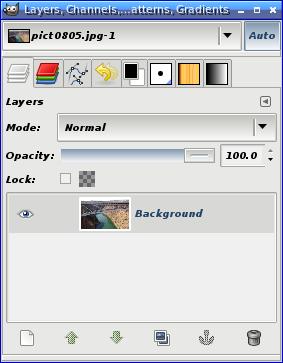
- Choose the Path tool ('B' key) and select the path that you created earlier
- Click "Stroke Path" and choose appropriate line styles

Friday, September 20, 2013
Visual Studio 2010 - Remote debugging of processes on x64/x86 Windows XP running on VirtualBox
There is a possibility to remotely debug processes on x64/x86 Windows XP running on VirtualBox.
In order to debug remotely one needs to setup some security settings first:
Open:
- Control Panel
- Administrative Tools
- Local Security Settings
- Network access: Sharing and security model for local accounts
- and we set this to:
Classic - local users authenticate as themselves

We have to download the Visual Studio Remote Debugger: Visual Studio Remote Debugger x64 x64.7z
and set its options:
- No Authentication (native-only)
- Allow any user to debug

In Visual Studio we select: Debug -> Attach to process
And choose transport: Remote.
Next we enter the computer name and click Refresh.

Sadly on Visual Studio 2012 it is NOT possible to debug remotely on Windows XP:
http://blogs.msdn.com/b/vcblog/archive/2012/10/08/10357555.aspx
Remote Debugging The Remote Tools for Visual Studio 2012 do not support remote debugging on an XP client. When debugging on Windows XP is required, it is recommended to use the debuggers of an older version of Visual Studio, such as Visual Studio 2010, for local or remote debugging. This is in line with the Windows Vista experience for Visual Studio 2012 RTM, which is a runtime target but not a remote debugging target.
EDIT:
To enable the debugger to LOAD SYMBOLS for debugging - change NO AUTHENTICATION to WINDOWS AUTHENTICATION.
Monday, September 16, 2013
Android 4.1+ full application backup using ADB without ROOT!
Backing all your application data from Android 4.1 (Jelly Bean) and up is really easy.
1. Step one: Enable developer options & USB debugging on your phone
2. Step two:
To backup
> adb backup -apk -all -f backup.ab
To restore:
> adb restore backup.ab
Backup process takes usually from 5 to 10 minutes.
More at:
HTC One root (how to backup using ADB)
1. Step one: Enable developer options & USB debugging on your phone
2. Step two:
To backup
> adb backup -apk -all -f backup.ab
To restore:
> adb restore backup.ab
Backup process takes usually from 5 to 10 minutes.
More at:
HTC One root (how to backup using ADB)
Monday, September 2, 2013
Android 4.x Galaxy S3 MTP on Ubuntu
MTP protocol on Ubuntu 10.04 is very unstable. Fortunately there is a FUSE filesystem called Go-mtpfs, created by a Google employee because "mtpfs was very unstable".
To install go-mtpfs on Ubuntu and connect Samsung Galaxy S3 using MTP on Ubuntu just do the following:
sudo add-apt-repository ppa:webupd8team/unstable
sudo apt-get update
sudo apt-get install go-mtpfs
sudo apt-get install go-mtpfs-unity
Then from "Dash home" search for "mtp" and an application (actually a script) called "Mount Android Device" should come up.
Right-click and choose "Mount Android Device".
The phone will be mounted as "MyAndroid" device.
source:
http://www.webupd8.org/2012/12/how-to-mount-android-40-ubuntu-go-mtpfs.html
http://www.youtube.com/watch?v=6pelKv939N8
Why did I choose go-mtpfs in the first place?
mtpfs gave me an errors and loaded for long minutes or not at all.
To install go-mtpfs on Ubuntu and connect Samsung Galaxy S3 using MTP on Ubuntu just do the following:
sudo add-apt-repository ppa:webupd8team/unstable
sudo apt-get update
sudo apt-get install go-mtpfs
sudo apt-get install go-mtpfs-unity
Then from "Dash home" search for "mtp" and an application (actually a script) called "Mount Android Device" should come up.
Right-click and choose "Mount Android Device".
The phone will be mounted as "MyAndroid" device.
source:
http://www.webupd8.org/2012/12/how-to-mount-android-40-ubuntu-go-mtpfs.html
http://www.youtube.com/watch?v=6pelKv939N8
Why did I choose go-mtpfs in the first place?
mtpfs gave me an errors and loaded for long minutes or not at all.
Subscribe to:
Posts (Atom)