Search This Blog

Tuesday, April 12, 2016

Kotlin during Android Developer Group Poznań (ADG) meetup


Last week I presented STX Insider project at Android Developer Group meetup in Poznań, Poland (ADG). It’s entirely written in JetBrains’ new programming language Kotlin. The presentation was focused on technical aspects of the code, mainly on nullpointer safety, interoperability with Java, final value preference, nullable types and extension functions. After the talk, participants had the chance to answer a few questions about the language.

One can draw the following conclusions from the survey:
  • developers are intersted in Kotlin but most of them haven’t written anything in it yet
  • they see the potential but aren’t ready to abandon Java just yet

Event details (ADG Poznań):
https://www.facebook.com/PoznanADG/posts/1458635877496012

Presentation slides:
http://www.slideshare.net/BartoszKosarzycki/adg-pozna-kotlin-for-android-developers


Thursday, April 7, 2016

Kotlin advanced - language reference for android developers


Kotlin - one of the popular programming languages built on top of Java that runs on JVM.

As a mobile team we got interested in Kotlin a few months before its final release which gave us time to test it thoroughly before production use. The language has some clear advantages for an Android programmer - it enables migration from Java projects that have been under development for some time already. Java&Kotlin coexistence simplifies Kotlin introduction as only new functionality is written in JetBrain’s new language leaving all the legacy code untouched.

Transitioning gives the developer an opportunity to use lambdas, new syntax for data objects, extension functions to easily expand Android SDK’s classes functionality and infix notation to write DSL-like structures. Almost all the libraries you use today will work with Kotlin thanks to 100% Java compatibility. The same is true for Android SDK classes - all of them will seamlessly work with the new programming language. Kotlin gives you more choice when it comes to reflection, creating documentation and being null-pointer safe. Android works great with it out of the box so you won’t need to change your development habits.

Our production project in Kotlin turned out to be a success after 4 months of development. We had 0 bugs related to Kotlin as a programming language. Our code footprint is almost 30% smaller thanks to JetBrain’s, we benefit from nullpointer safety, closures, translated enums, data objects and use infix notation for logging and displaying Snackbars.

Kotlin advanced - language reference for android developers

Second talk on Kotlin language we had at STXNext. We try go deeper into language specifics and look at the positive impact new syntax can have on boilerplate removal and readability improvement. Kotlin really shines in Android development when one looks at “Enum translation”, “Extension functions”, “SAM conversions”, “Infix notation”, “Closures” and “Fluent interfaces” applied to lists. The talk, however, compares language-specifics of Java & Kotlin in terms of “Type Variance”, “Generics” and “IDE tools” as well.


Monday, March 21, 2016

Zulip IM


Lately we've moved to Zulip as our main company IM app.
The story behind Zulip is that it was created as group chat application optimized for software development teams and later on (around 2014) acquired by Dropbox. The development of the core application ceased due to harsh competition from Slack. On Sept 25, 2015 the original Zulip team decided to open-source the project and make it publicly available.
Zulip has some clear advantages over the pure internal jabber server, the main of which is the web client access and no configuration to hassle with (other features are listed here - https://zulip.org/features.html)

Zulip's Android app has not been updated since Feb, 2015 and probably will never be so we took the code and refreshed it. On the plus side - it works with our internal IM server, the design has been slightly refreshed (although almost no material design is present there).
With the current version push-notifications are switched off so there is no battery drain and the IM doesn't bother you until you open the app to have a chat.
In future versions push notifications will be present ONLY as an option.

You can download the app here:
https://goo.gl/u8QU1x

The source code is available here:
https://github.com/kosiara/zulip-android


Tuesday, February 16, 2016

Kotlin Developer Starter in Android projects


During our STX Next's Lightning Talks I'd given a presentation about Kotlin. It's a quick starter about the language. The idea was to create a short talk that would fit in a timeframe of 45m-1h. I assumed that attendees had basic skills from Android development, functional programming, java JDK and some JVM languages like - scala, closure or groovy.


Slideshare presentation:
https://t.co/oVPJw1YIGa


Presentation summary:
Kotlin - one of the popular programming languages built on top of Java that runs on JVM. Thanks to JetBrains support and excellent IDE integration, it’s an ideal choice for Android development. 100% Java compatibility, interoperability and no runtime overhead is just the beginning of a long list of strengths. Kotlin is supposed to be a subset of SCALA, on one hand covering major advantages for developers and keeping short compile times on the other.

This presentation is a Developer Starter - a set of hand-picked information allowing a person with no knowledge of Kotlin to start writing basic Android activities and set up a kotlin-based Android project. It starts with language background, reasons for its creation and advantages. Then presents basic use cases, syntax, structures and patterns. Later on Kotlin is presented in Android context. Simple project structure, imports and Kotlin usage with Android SDK is explained. In the end cost of Kotlin compilation is presented and the language is compared to SCALA and SWIFT.


Tuesday, December 8, 2015

Automated acceptance tests in Calabash

The Mobilengers team at StxNext has recently moved to Calabash as our automated acceptance testing framework. All tests are written in Gherkin - simple, descriptive language that Cucumber can understand. Gherkin gives the ability to describe the desired behaviour in plain text preserving the possibility to run such a test on real devices. It serves two purposes - as a documentation tool and as automated tests framework. It has been translated to over 60 spoken languages (with leading English) so that your team can use the keywords in their own language.

Automated tests follow two simple conventions - that source file should be saved as .feature and that one source file should only contain description of a single feature.

Calabash is the mobile implementation of Cucumber. It enables native apps testing and is cross-platform - Android/iOS. It’s also open-source with all the code available freely on GitHub.

With Calabash we’re able to implement simple gestures (like - swipe down, button-clicks, go back etc.), make assertions concerning displayed content as well as take screenshots whenever something goes wrong in the app.

Running tests in the cloud on the real devices gives us the possibility to cover more devices without buying every phone available on the market. We use Amazon AWS Device Farm which has the possibility to run Calabash tests and covers most popular device models. It also gives detailed tests results, takes screenshots as well as pinpoints references to lines of source code where specific errors have originated from. AWS has the option to test apps in different device locales, GPS locations and specific “other apps” dependencies.

Simple tutorial on how to install Calabash (OsX/Ubuntu) and run basic tests can be downloaded here.


Reference:
https://github.com/kosiara/calabash-android-example-projects
https://github.com/calabash/calabash-android
https://github.com/calabash/calabash-ios
https://cucumber.io/
https://github.com/cucumber/cucumber/wiki/Gherkin
http://www.slideshare.net/Codemotion/calabash-codemotion-2012 (ios)
http://docs.aws.amazon.com/devicefarm/latest/developerguide/welcome.html

Books:
https://pragprog.com/book/hwcuc/the-cucumber-book


Sunday, May 10, 2015

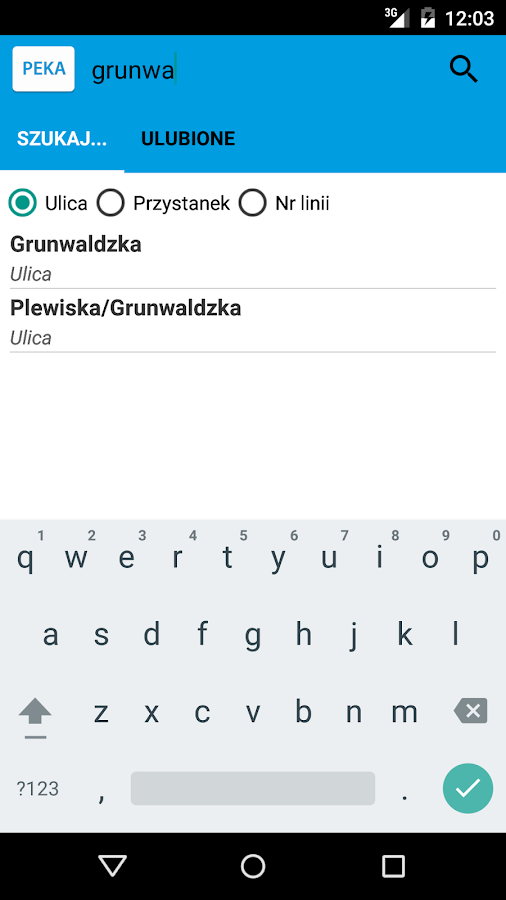
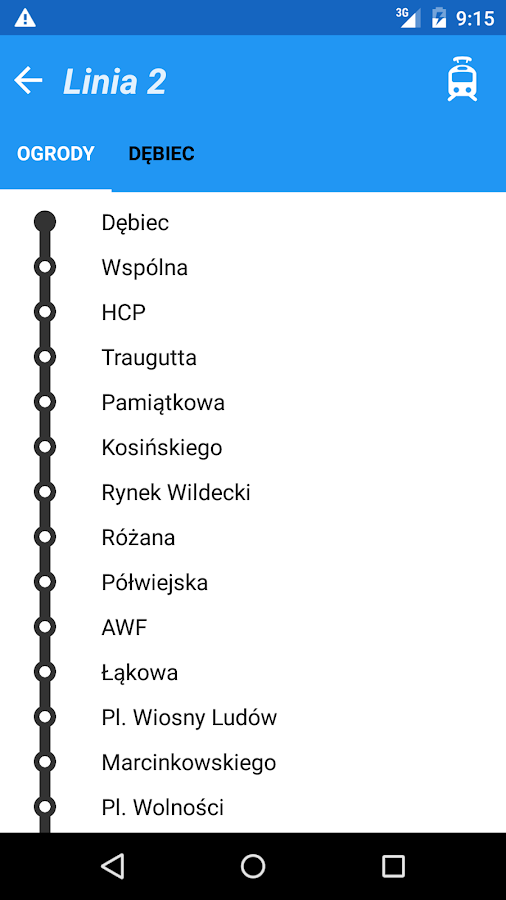
PEKA - wirtualny monitor

Niedawno rozpoczęły się prace nad aplikacją umożliwiającą sprawdzanie dokładnego czasu przyjazdu tramwajów i autobusów.
Nareszcie możliwe jest wygodne korzystanie z wirtualnego monitora systemu PEKA na urządzeniach mobilnych.

Jeżeli mieszkasz w Poznaniu - wybierz ulicę, a następnie swój przystanek - aby zobaczyć dane, które pozwolą Ci DOKŁADNIE określić w którym momencie przyjedzie Twój tramwaj/autobus.

Funkcje:

- szukaj połączeń autobusowych/tramwajowych według ulicy/nazwy przystanku/nr linii

- dodawaj poszczególne przystanki do ulubionych, aby mieć do nich szybki dostęp

- połączenia z rzeczywistym czasem przyjazdu są oznaczone niebieskim "GPS"
- widget umożliwiający obserwowanie swojego ulubionego przystanku


Kliknij tutaj, aby przejść do Google Play.


Saturday, April 4, 2015

OsX - handful of shortcut key combinations

1. q: Where is the insert key  a: Apple's keyboard does not have an insert key
   emulate 'ins' key by pressing Ctrl + "t"

2. q: Where is the ~ key?  a: to the right of the left "shift" key

3. q: How to take a screenshot of the screen? a: press "ctrl" + 3 - to take the screenshot of the entire screen and "ctrl" + 4 - to take the screenshot of the selected screen area. Screenshots are saved on the desktop


Resources:
mac-os-x-and-midnight-commander-the-missing


Sunday, March 29, 2015

OsX - default partition table

What is the default partition type on OsX 10.10 Yosemite?

Partition table: GUID partition table (gpt)
partition type: hfs+


Wednesday, March 18, 2015

OsX - choose the right Java version for Intellij 14 CE


/Applications/IntelliJ IDEA 14 CE.app/Contents/bin/inspect.sh

2015-03-18 21:02:24.425 idea[962:382297] No matching VM found.
[JavaAppLauncher Error] CFBundleCopyResourceURL() failed loading MRJApp.properties file
[JavaAppLauncher Error] CFBundleCopyResourceURL() failed while getting Resource/Java directory
[LaunchRunner Error] No main class specified
[JavaAppLauncher Error] CallStaticVoidMethod() threw an exception
Exception in thread "main" java.lang.NullPointerException
at apple.launcher.LaunchRunner.run(LaunchRunner.java:113)
at apple.launcher.LaunchRunner.callMain(LaunchRunner.java:51)
at apple.launcher.JavaApplicationLauncher.main(JavaApplicationLauncher.java:61)


Download the newest "Apple Java" from here.
Download the regular Oracle Java.


Remember to set the JAVA_HOME variable in .bash_profile correctly:
export JAVA_HOME= /Library/Java/JavaVirtualMachines/jdk1.8.0_40.jdk/Contents/Home

You can also edit the file: /Applications/IntelliJ IDEA 14 CE.app/Contents/Info.plist

and change 1.6 to 1.8


Friday, March 6, 2015

Friday, February 27, 2015

Ubuntu 14.04 LTS Chrome - enable touch mode (Android-like support)

1. Check you Chrome flags configuration - go to chrome://flags

Enable touch events Mac, Windows, Linux, Chrome OS
Enable pinch scale. Windows, Linux, Chrome OS
Enable pinch virtual viewport. Windows, Linux, Chrome OS, Android
Enable touch based text editing Windows, Linux, Chrome OS

2. Check the no. of your touch-panel

xinput list

for me it gave:

Atmel Atmel maXTouch Digitizer           id=10 [slave  pointer  (2)]

3. Start your chrome browser with the following script


#!/bin/bash
sudo killall chrome
#xinput list  # list input devices 
google-chrome --touch-devices=10 &


Tuesday, February 17, 2015

Android SMS to HTML backup / exporter

The application SMS to HTML exporter that I recently published for  the Android platform enables the user to easily export all his/her messages into a convenient HTML format that can be sent to a desirable email address instantly.

The fresh, material-design inspired and simple user interface should get anyone going in moments.

The application can be downloaded from Google-Play: here

or just copy-paste this address:
https://play.google.com/store/apps/details?id=com.bkosarzycki.smstohtmlexporter

Screenshots:


Tuesday, February 3, 2015

Git - show number of project lines of code for a specific user


To see number of:

  • added lines
  • removed lines
  • total lines of code
for a specific user, use the following:


git log --author="Name Surname" --pretty=tformat: --numstat | gawk '{ add += $1; subs += $2; loc += $1 - $2 } END { printf "added lines: %s removed lines: %s total lines: %s\n", add, subs, loc }' -


Android project - count lines of code

In the project directory execute the following command. It searches for all *.java files and counts their lines of code - ignoring _*.java files which are generated by Android Annotations.


find . -name '*.java' -not -name '*_.java' | xargs wc -l


Tuesday, December 23, 2014

Add JavaScript/CSS syntax highlighting in Android Studio

  • From Android Studio Menu, go to File -> Import Settings...
  • Locate the settings.jar file from this repository
  • From "Select Components to Import" make sure you have "File types" checked, then press OK

Download this file:
https://github.com/manifestinteractive/android-studio-filetypes/blob/master/settings.jar


Friday, December 12, 2014

Android: get sha from *.apk file; validate *.apk content; check apk integrity

The apk file might get destroyed when it's transferred through a network. If the file is signed with a certificate (most Android applications are signed by the publisher) you can check the file integrity from the command line before installing the application. The following methods check the certificate validity as well as validate apk file contents.


keytool -list -printcert -jarfile app-sa.apk

(java/jre/bin/keytool)


 Signer #1:  
   
 Signature:  
   
 Owner: CN=Somevalue, OU=Developers, O=Somevalue. Somevalue, L=Somevalue, ST=Somevalue, C=PL  
 Issuer: CN=Somevaluei, OU=Developers, O=Somevalue Somevalue, L=Somevalue, ST=Somevalue, C=PL  
 Serial number: Somevalue  
 Valid from: Thu Jul 17 11:25:00 CEST 2014 until: Mon Jul 11 11:25:00 CEST 2039  
 Certificate fingerprints:  
       MD5: 11:11:11:11:11:11:11:11:11:11:A3:D8:B5:11:11:11  
       SHA1: 11:11:11:11:11:11:11:11:11:0D:42:BC:2D:01:11:11:11:11:11:11  
       SHA256: 11:11:11:11:11:11:11:11:11:11:11:11:D4:7C:B7:1C:C8:14:8E:43:11:11:11:11:11:11:11:11:3E:11:11:11  
       Signature algorithm name: SHA256withRSA  
       Version: 3  
   
 Extensions:   
   
 #1: ObjectId: 2.5.29.14 Criticality=false  
 SubjectKeyIdentifier [  
 KeyIdentifier [  
 0000: 11 11 11 11 11 11 11 11  11 11 11 11 11 11 36 F3 ..]....%.B....6.  
 0010: 11 11 11 11                    ....  
 ]  
 ]  


jarsigner -verbose -verify -certs app-sa.apk

(java/jre/bin/jarsigner)


 sm    162096 Thu Dec 11 16:39:46 CET 2014 resources.arsc

      X.509, CN=Somevalue, OU=Developers, O=Somevalue Somevalue, L=Somevalue, ST=Somevalue, C=PL
      [certificate is valid from 7/17/14 11:25 AM to 7/11/39 11:25 AM]
      [CertPath not validated: Path does not chain with any of the trust anchors]

sm    4416396 Thu Dec 11 16:40:46 CET 2014 classes.dex

      X.509, CN=Somevalue, OU=Developers, O=Somevalue Somevalue, L=Somevalue, ST=Somevalue, C=PL
      [certificate is valid from 7/17/14 11:25 AM to 7/11/39 11:25 AM]
      [CertPath not validated: Path does not chain with any of the trust anchors]

sm       621 Thu Dec 11 16:40:48 CET 2014 androidannotations-api.properties

      X.509, CN=Somevalue, OU=Developers, O=Somevalue Somevalue, L=Somevalue, ST=Somevalue, C=PL
      [certificate is valid from 7/17/14 11:25 AM to 7/11/39 11:25 AM]
      [CertPath not validated: Path does not chain with any of the trust anchors]

s      32963 Thu Dec 11 16:40:50 CET 2014 META-INF/MANIFEST.MF

      X.509, CN=Somevalue, OU=Developers, O=Somevalue Somevalue, L=Somevalue, ST=Somevalue, C=PL
      [certificate is valid from 7/17/14 11:25 AM to 7/11/39 11:25 AM]
      [CertPath not validated: Path does not chain with any of the trust anchors]

       32984 Thu Dec 11 16:40:50 CET 2014 META-INF/CERT.SF
        1495 Thu Dec 11 16:40:50 CET 2014 META-INF/CERT.RSA

  s = signature was verified 
  m = entry is listed in manifest
  k = at least one certificate was found in keystore
  i = at least one certificate was found in identity scope

jar verified.
The latter of the methods verifies apk content as well. 


Monday, December 8, 2014

Android Studio - new Android 5.0 Lollipop emulators; Intel hardware-assisted virtualization; Android Studio Android 5.0 emulator landscape mode


Google has released the new Android Studio 1.0 RC 4. It consists new Android emulators (in the SDK of course) which take full advantage of Intel hardware-assisted virtualization and can use the host GPU.

Here is how to enable these on your Intel machine.


Android Emulator Shortcuts

Ctrl+F11 Switch layout orientation portrait/landscape backwards

Ctrl+F12 Switch layout orientation portrait/landscape forwards

Main Device Keys
Home Home Button

F2 Left Softkey / Menu / Settings button (or Page up)

Shift+f2 Right Softkey / Star button (or Page down)

Esc Back Button

F3 Call/ dial Button

F4 Hang up / end call button

F5 Search Button

Other Device Keys
Ctrl+F5 Volume up (or + on numeric keyboard with Num Lock off) Ctrl+F6 Volume down (or + on numeric keyboard with Num Lock off) F7 Power Button Ctrl+F3 Camera Button

Ctrl+F11 Switch layout orientation portrait/landscape backwards

Ctrl+F12 Switch layout orientation portrait/landscape forwards

F8 Toggle cell network

F9 Toggle code profiling

Alt+Enter Toggle fullscreen mode

F6 Toggle trackball mode


Sunday, December 7, 2014

Ubuntu mount nfs share

Ubuntu does not come with nfs server so we need to install it:

$ sudo apt-get install nfs-kernel-server

Then we can mount nfs shares like this:

$ sudo mount 1.2.3.4:/home /home/user/nfs/home


to check whether the share mounted successfully:

mount -t nfs


more info

Friday, November 28, 2014

Ubuntu 14.04 - how to create shortcuts in unity launcher

To create a shortcut to an application in unity launcher just make in a symlink in one of the following locations:

/home/user/.local/share/applications

or

/usr/share/applications

or

/usr/local/share/applications

Example command:

ln -s /home/user/applicationsFolder/app1 /usr/share/applications/app1


Build Android apps as Chrome apps/extensions, Build Android apps for ChromeOS, configure build server

What I want to accomplish is configure a build server (like TeamCity) to build an Android application from source and convert it to a chrome extension that can be published on Chrome WebStore as an application.

First of all you can read this source which explains how to run android apps in chrome.

1. Download ARChon runtime and install it as an extenion in Chrome.

2. You can convert your apk manually with this chrome extension - Twerk

3. To enable Chrome App Launcher on Ubuntu (speeds up app launching) - follow this link.

4. Install chromeos-apk
asdsa

  1. In a terminal, run the following command: sudo apt-get install npm
  2. (Ubuntu only): Run the following command: sudo apt-get install lib32stdc++6
  3. Download node.js.
  4. Unzip the tar.gz file you downloaded from the above link.
  5. Per the README file, open a terminal to the unzipped folder containing node.js. And run the following commands in order:
    1. ./configure
    2. make
    3. make install
  6. Run the command: sudo npm install chromeos-apk -g
  7. To make sure you're updated to the latest version (now or in the future), run: sudo npm install -g chromeos-apk@latest
5. Convert your compiled application in apk to chrome app with:

chromeos-apk --tablet --scale --name ApplicationName application.apk


5. Remember - to update the chromeos-apk plugin just run:

sudo npm install -g chromeos-apk@latest